The workspace
Meaning first. Then tone. Then grammar.
Copynote is one place to write work English. Draft in the language you think in, pick the tone the situation needs, and send something that reads like you — without the translator tab, the grammar tab, and the fifth rewrite.
Beta opens this season — starting with people who write at work in a second language.
THE PROBLEM
The cost isn’t grammar. It’s the second-guessing.
Most tools fix the sentence you already managed to write in English. None of them tell you whether it lands the way you intended — so you rewrite it again, and send it late.
The old way
- A translator open in one tab
- A grammar checker in another
- A thesaurus, because the first word felt wrong
- A colleague on Slack, asked whether it sounds rude
- The last email you sent, reopened as a template
- The draft itself, rewritten four times
The Copynote way
- One editor — draft, tone, grammar, and vocabulary in the same place
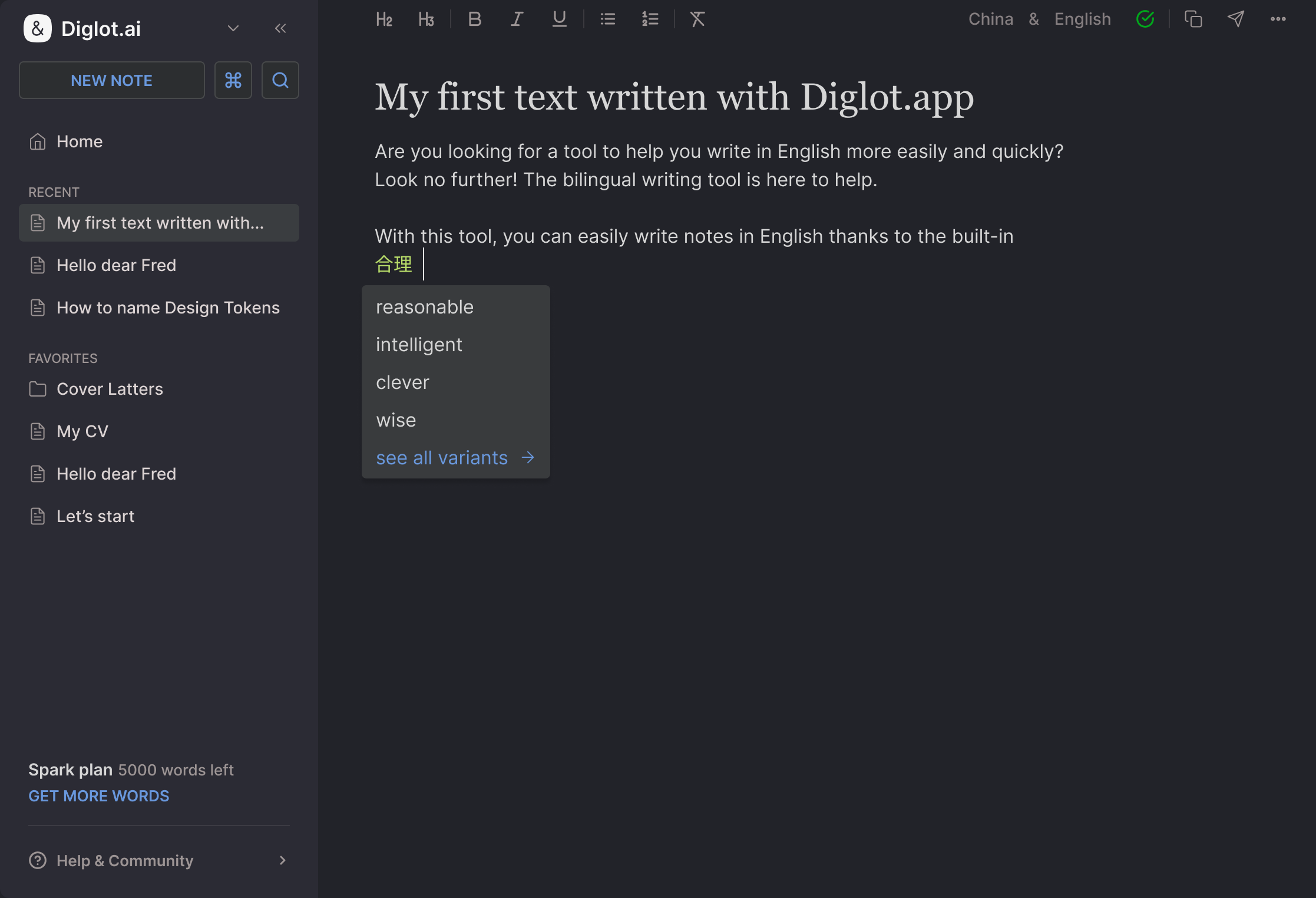
- Write in your language; the English keeps your meaning
- Register you choose: client, manager, teammate, public
- Your team’s terms stay your team’s terms
- Every change shown as a diff you accept or reject
Everything the message needs, in one place
Meaning, tone, grammar, and your own vocabulary — carried from the first draft to the send button.

Write it the way you think it — your language, half-English, or bullet points — and get an English version that keeps your meaning and your intent.

The same update for a client, a manager, or a Slack channel. Firm without being aggressive, warm without being vague.

Articles, prepositions, tense — the mistakes that make good work look careless. Each one explained in your language, so it stops repeating.

Product names, internal terms, and the phrasing your team actually uses — kept consistent instead of being “corrected” away.

Gmail, Slack, LinkedIn, Docs. The same workflow in the browser, so nothing has to be copy-pasted out and back.

Work drafts carry client names and numbers that are not public. We never train models on what you write.
THE SHAPE OF A SESSION
From “how do I even start this” to sent
The same five movements every time — and the words you decided on stay decided.
Say what you mean
Write the message in whatever language it comes out in. No need to pre-translate it in your head first — that step is where the meaning usually gets lost.
Choose the room
Client, manager, teammate, public post. The register changes; the facts do not.
Read the English
You get a version you can actually send, with the changes shown as a diff — so you can see what was changed and why, and reject anything that is not you.
Keep the words that are yours
Product names, internal terms, and your own phrasings go into your vocabulary once and are respected from then on.
Send it
Copy it out, or write it in place in Gmail, Slack, or Docs. Next week the same message takes a minute, not half an hour.
One place for the English
your job is written in
Copynote is in beta — we’re onboarding people who write at work in a second language first. Apply and we’ll reach out as spots open.